Editable Order Form Canva Template for Creators
Managing a creative business or organizing a craft fair requires more than just great products; it demands professional organization. An Editable Order Form, Canva Template transforms the chaotic process of taking orders into a streamlined, branded experience. Whether you are a hobbyist selling handmade goods at a local market or an entrepreneur scaling a digital shop, having a reliable way to capture customer details is essential. This tool bridges the gap between casual sales and professional operations without requiring any design skills.
What Is This Editable Order Form?
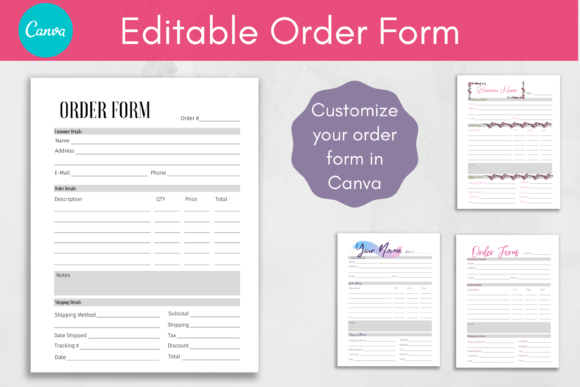
At its core, this template is a pre-designed document that allows you to customize every text element to fit your specific needs. Unlike static PDFs where you cannot change anything, this Printable Order Form Template offers flexibility while maintaining a polished structure. You can access the design through Canva, a popular graphic design platform, and modify fonts, colors, and sizes to match your brand identity perfectly.
The file comes in two distinct formats to serve different purposes. First, there is a ready-to-use PDF version of the Order Form. This is ideal if you need a quick solution for printing immediately without making changes. Second, you receive a PDF containing instructions and a direct link to the editable template in Canva. This second option unlocks the full potential of the design, allowing you to add your logo, insert decorative elements, and tailor the layout to your unique workflow.
Customization Without Design Skills
One of the most appealing aspects of this resource is the level of personalization available to users with varying skill levels. You do not need to be a graphic designer to make your order form look professional. The interface allows you to swap out standard fonts for something that reflects your personality, whether that is bold and modern or soft and elegant. You can also adjust color schemes to align with your existing marketing materials.
While the structural lines and layout remain fixed to ensure the form functions correctly, the text areas are fully open for editing. This means you can rename fields, change labels, and update pricing structures instantly. Adding your own logo is as simple as dragging and dropping an image file onto the canvas. These small touches make a significant difference in how clients perceive your business, turning a simple transactional document into a branding opportunity.
Why Choose a Canva-Based Template?
In the past, creating custom forms required hiring a designer or spending hours learning complex software. Today, the accessibility of tools like Canva has democratized design. Using an Editable Order Form, Canva Template ensures that you have a versatile asset that lives in the cloud, accessible from any device with an internet connection. This convenience is crucial for busy creators who might be on the go at a craft fair or working from home.
The template is designed to support a wide range of use cases. For those attending craft fairs, you can print the forms on high-quality paper to hand out to customers. Alternatively, you can fill them out digitally on a tablet or laptop before sending them via email. This dual functionality makes it perfect for hybrid businesses that operate both online and offline. It eliminates the friction of handwritten notes, which can often lead to errors in spelling names or miscalculating totals.
Perfect for Creative Entrepreneurs
Small business owners often wear many hats, handling everything from product creation to customer service. A dedicated order form helps organize these tasks efficiently. By using a standardized template, you reduce the mental load of setting up new documents for every sale. It creates a consistent process that feels professional to your clients.
Educators and freelancers also find value in this tool. Teachers can use it to collect project materials or fees, while freelance writers or designers can use it to outline project requirements and deposits. The versatility extends to planners and publishing uses as well. You can insert the form into a larger planner system or use it as a standalone sheet for client intake. The only requirement is that you have either a free or pro Canva account to utilize the template features.
Practical Use Cases and Scenarios
To understand the true value of this template, consider how it solves real-world problems. Imagine you are running a booth at a weekend farmers' market. Customers want to place large orders for holiday gifts, but they don't have their credit cards with them. With a printed version of your order form, you can take their details, describe the items, and calculate the total manually or with a calculator. Later, you can digitize the information to process payment and fulfill the order.
Another scenario involves a blogger or influencer launching a new merchandise line. They might send a digital version of the form to their audience as a way to gauge interest before production begins. Because the text is editable, they can easily add questions about preferred sizes or colors, gathering valuable data before committing resources. This prevents overstocking and ensures that the final products meet customer demand.
- Craft Fairs: Print copies to keep in a clipboard for easy access during events.
- Digital Sales: Fill out the form on a computer and email it to the client for confirmation.
- Client Onboarding: Use the structure to gather necessary details for service-based work.
- Event Planning: Collect RSVPs and dietary restrictions for workshops or gatherings.
Important Considerations Before You Start
While this tool is incredibly user-friendly, there are a few technical details to keep in mind to ensure a smooth experience. First, remember that only the text areas are editable. The lines, borders, and overall structure are locked to maintain the integrity of the design. This prevents accidental formatting issues that could ruin the print quality or readability of the final document.
Additionally, please note that example order forms are not included in the download. You will start with a blank slate, which gives you the freedom to create exactly what you need without having to delete pre-filled dummy data. However, this does mean you will need to think about what information is relevant to your specific business model. Do you need space for shipping addresses? Are you collecting deposit amounts? Tailoring these fields is part of the customization process.
You must also have a Canva account to access the editable version. Both free and paid accounts work, though a Pro account may offer additional premium elements if you wish to expand the design later. If you prefer not to edit the design, the included PDF version allows you to use the form as is, saving you time on setup.
Expanding Your Toolkit
If you find that this Editable Order Form, Canva Template fits your needs, you might appreciate other resources available in the Hustle Smart Shop. The shop specializes in printable forms and designs that help streamline various aspects of life and business. Exploring these options can provide a cohesive set of tools that all share a similar aesthetic and functional approach.
Thank you for visiting my shop. We hope this template empowers you to run your business more efficiently and professionally. By taking control of your documentation, you free up more time to focus on what you do best: creating amazing work and connecting with your community.