4 Pearl Necklace Procreate Brushes for iPad Art
Digital illustration often requires a delicate balance between technical precision and organic flow. When an artist attempts to draw intricate jewelry or decorative borders by hand, the result can sometimes appear rigid or mechanically uniform. This is where specialized tools like 4 Pearl Necklace Procreate Brushes become essential for creators who demand high-quality details without spending hours on repetitive tasks. These brushes are designed to replicate the elegance of actual pearl necklaces, offering a seamless way to add sophistication to digital designs.
The core value of this brush set lies in its ability to simulate depth and texture that standard pencils or markers cannot achieve easily. Whether you are designing a wedding invitation, creating a character accessory for a graphic novel, or developing marketing materials for a luxury brand, having access to realistic pearl elements saves significant time. Instead of drawing each individual bead manually, these brushes allow you to create continuous, flowing lines of pearls with a single stroke. This efficiency is crucial for professionals who need to deliver polished work quickly while maintaining artistic integrity.
Understanding the 2D and 3D Capabilities
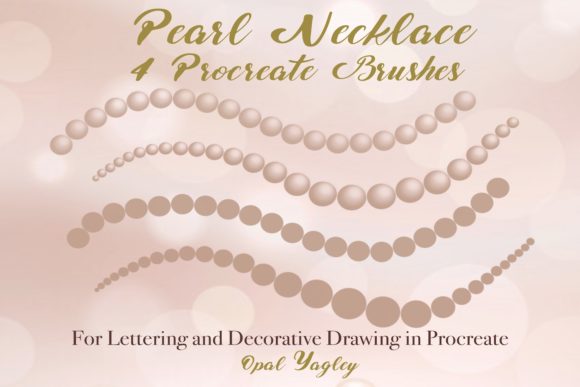
One of the most distinct features of this collection is the inclusion of both two-dimensional and three-dimensional rendering options. The 2D Pearl Necklace Monoline brush produces a flat, consistent look where every pearl remains the same size throughout the line. This is particularly useful for flat design styles, vector-like illustrations, or when you need a clean, minimalist aesthetic that fits well into modern web layouts or social media graphics.
In contrast, the 3D Pearl Necklace Monoline adds a layer of realism by simulating light and shadow, giving the impression that the pearls have volume and curvature. This is ideal for product mockups or editorial illustrations where lighting plays a critical role in the overall mood. By choosing between these monoline options, artists can decide whether their design should feel graphic and stylized or lifelike and tactile.
Mastering Pressure Sensitivity for Dynamic Results
While consistency is valuable, many artistic projects require variation to feel natural. This is where the pressure-sensitive versions of the brushes shine. The 2D Pearl Necklace Pressure and 3D Pearl Necklace Pressure brushes respond directly to the force applied with your Apple Pencil or compatible stylus. As you press harder, the pearls grow larger; as you lighten your touch, they shrink.
This feature transforms the drawing process from a static activity into a dynamic performance. For instance, if you are sketching a necklace draped around a character's neck, the pearls will naturally appear smaller at the top of the curve where tension might be higher, and larger where the chain hangs loosely. This level of control allows hobbyists and professionals alike to create custom jewelry designs that look hand-crafted rather than stamped out by software. It supports the creative goal of making digital art feel human and imperfect in the best possible way.
Practical Applications for Professionals and Creators
The versatility of these brushes extends across various industries. Marketers and small business owners often struggle to create unique visual assets that stand out in a crowded digital landscape. Using 4 Pearl Necklace Procreate Brushes, a marketer can instantly upgrade a plain logo or social media post with elegant decorative borders that convey luxury and trustworthiness. This simple addition can elevate the perceived value of a product or service without requiring expensive photography or complex 3D modeling software.
Educators and bloggers also find these tools invaluable. When creating course materials, worksheets, or blog headers, adding decorative elements helps break up text and keeps the audience engaged. A teacher designing a lesson plan about history or fashion can use the 3D pearl brushes to illustrate ancient jewelry techniques, providing students with a visual aid that is both accurate and engaging. The ability to change colors on the fly means that educators can adapt the visuals to match any theme, from royal blue for a history lesson to soft pastels for a craft workshop.
Freelancers working on book covers or magazine layouts benefit significantly from the speed these brushes offer. The .brushset file includes four distinct tools that cover most scenarios. If a client requests a "pearl-encrusted" frame for a book cover, the artist can apply it in seconds rather than minutes. This efficiency translates directly to profitability, allowing freelancers to take on more projects or allocate more time to refining other aspects of their work.
Technical Requirements and Limitations
To utilize these tools effectively, it is important to understand the specific hardware and software ecosystem required. These brushes are built exclusively for the Procreate app on the iPad or iPad Pro. They rely heavily on the pressure sensitivity data provided by the Apple Pencil or other compatible styluses. Without this input, the pressure-sensitive features will not function correctly, limiting the user to basic strokes.
A critical limitation to note is compatibility. These brushes DO NOT work in Photoshop or other desktop applications. While Photoshop has powerful brush engines, it does not support the proprietary .brushset format used by Procreate. Users looking to integrate these pearls into a desktop workflow must either purchase the Procreate version and export the final artwork as a high-resolution image or rasterize the layers before importing them elsewhere. This distinction ensures that users do not waste money expecting cross-platform functionality.
Furthermore, the effectiveness of the brushes depends on the quality of the stylus. A low-quality pen without pressure sensitivity will only produce the monoline effects, negating the primary advantage of the pressure-sensitive variants. Therefore, investing in a reliable stylus is a prerequisite for getting the full value out of this set. For those already equipped with an iPad and Apple Pencil, however, these brushes represent a cost-effective way to expand their digital toolkit.
Maximizing Creativity with Customization
Once installed, the true potential of 4 Pearl Necklace Procreate Brushes is unlocked through experimentation. The prompt to "Change Colors of Pearls as Need" encourages users to move beyond traditional white or cream tones. You can create gold necklaces for fantasy characters, silver chains for sci-fi settings, or even rainbow-colored beads for children's books. The ability to adjust hue, saturation, and brightness after drawing allows for endless customization without needing to redraw the entire element.
This flexibility supports a workflow based on iteration. An artist can sketch a design in black and white to check the composition, then switch to a color palette to see how the lighting interacts with the different shades. This method simplifies decision-making and reduces the fear of making mistakes, as changes are non-destructive and reversible. It fosters an environment where creativity can flourish, aligning with the sentiment to "Have FUN Work with Love Passion."
For entrepreneurs launching a new brand, these brushes can help establish a cohesive visual identity. By using the same pearl style consistently across packaging, websites, and advertisements, a business creates a recognizable signature look. This attention to detail signals professionalism and care, which resonates with consumers aged 20 to 50 who value authenticity and quality in the products they buy.
Conclusion
In summary, this brush set offers a practical solution for anyone looking to enhance their digital art with realistic and elegant decorative elements. By combining the convenience of automated drawing with the nuance of pressure sensitivity, 4 Pearl Necklace Procreate Brushes bridge the gap between technical limitation and artistic expression. Whether you are a professional illustrator, a small business owner, or a hobbyist exploring digital media, these tools provide the means to create beautiful, high-quality work efficiently. With the right hardware and a willingness to experiment, the possibilities for creative growth are limitless.