Stamp Brush Procreate Watercolor Stroke: A Practical Evaluation
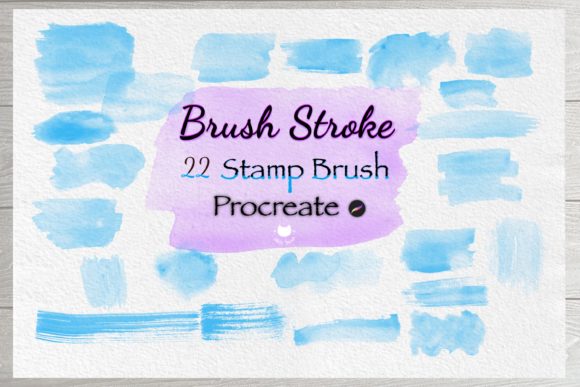
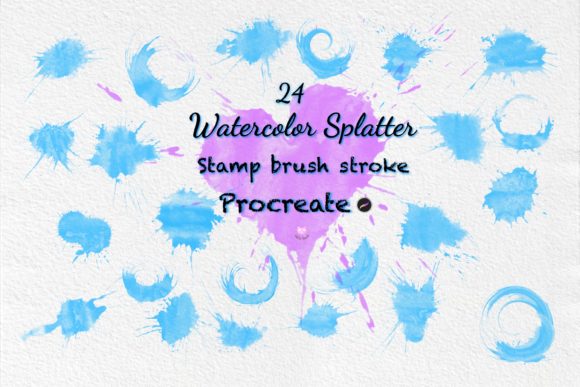
Digital illustration often requires a balance between precision and organic texture. For artists working within the Procreate ecosystem, achieving authentic watercolor effects can be time-consuming when starting from scratch. This is where specialized tools like the Stamp Brush Procreate Watercolor Stroke become relevant. The product in question is a collection of 24 pre-made brush files designed to replicate hand-painted watercolor splatters, ink splashes, and stamp-like strokes. These assets are intended for users who need quick access to decorative elements without manually painting each detail.
This evaluation explores the utility of this specific brush set, analyzing its features, workflow implications, and suitability for various design projects. Whether you are creating invitations, scrapbook layouts, or digital greeting cards, understanding the capabilities and limitations of these stamps is essential before adding them to your library.
Understanding the Product Offering
The core offering consists of a downloadable package containing 24 distinct brush files. These files are formatted specifically for the Procreate App, meaning they cannot be used in other digital art software like Photoshop or Clip Studio Paint without conversion. The brushes are described as "hand painted," suggesting that the original source material was created using traditional media (watercolor and ink) and then scanned or digitized to create the brush presets.
The set includes a variety of stroke types:
- Watercolor Splatter: Irregular, fluid shapes that mimic wet-on-wet techniques.
- Ink Splash: Higher contrast marks that simulate dried ink drops.
- Splatter Strokes: Textured variations suitable for background noise or edge detailing.
- Stamp Elements: Defined shapes that act as single-click ornaments.
Each file is ready to import directly into the application. Once imported, these brushes function as "stamps" in the sense that a single tap or drag produces a complex image, rather than building up color through multiple layers of pixel manipulation.
Reasons to Consider This Toolset
Artists and designers typically seek out stamp brushes to solve specific workflow bottlenecks. The primary advantage of the Stamp Brush Procreate Watercolor Stroke is efficiency. In traditional art, creating a realistic watercolor splash requires controlling water flow, pigment density, and paper absorption. Replicating this digitally with standard brushes involves complex layering, opacity adjustments, and blending modes. With these stamp brushes, the effect is achieved instantly.
This tool is particularly valuable for the following scenarios:
- Rapid Prototyping: When testing layout concepts for holiday cards or anniversary invitations, speed is crucial. These brushes allow for immediate visual feedback on how textures interact with typography and photos.
- Decorative Consistency: If a project requires a cohesive theme, such as a wedding invitation suite, using a standardized set of watercolor elements ensures that all decorations share the same artistic style and color palette.
- Scrapbooking and DIY Projects: Users creating digital scrapbooks often need to frame photos or add borders. These brushes serve as ready-made frames and accents, reducing the need to draw custom borders for every page.
Benefits and Tradeoffs
While the convenience is significant, it is important to weigh the benefits against potential tradeoffs. The most notable benefit is the reduction of technical friction. Artists do not need advanced knowledge of pressure sensitivity or brush engine settings to achieve high-quality results. The Procreate interface handles the complexity, allowing the user to focus on composition.
However, there are limitations inherent to any stamp-based system. The primary tradeoff is a lack of spontaneity. Because the brush delivers a pre-defined shape, the artist has less control over the exact distribution of pigment compared to painting with a standard brush. If a specific area of an image requires a subtle, irregular drip that does not match one of the 24 available options, the user may find the tool restrictive.
Additionally, the reliance on pre-set images means that scaling the strokes can sometimes result in pixelation if the original scans were not high resolution. While Procreate handles vector-like scaling well for many brushes, raster-based watercolor stamps must be checked at their maximum intended size to ensure clarity.
Installation and Usability
The integration process for this brush set is straightforward, which is a positive factor for both beginners and experienced users. The workflow generally follows three steps:
- Download: Acquire the .brushset file from the provider.
- Import: Open the file, which automatically launches Procreate and imports the brushes into the library.
- Access: Navigate to the Brush Library, locate the new group, and begin using the brushes immediately.
Once installed, these brushes behave like any other standard brush in the app. Users can adjust opacity, size, and rotation using standard gestures. This flexibility allows for some customization despite the "stamp" nature of the asset. For instance, lowering the opacity of a heavy ink splash can make it appear more like a faint wash, expanding the creative possibilities beyond the default appearance.
Situations Where Alternatives May Be Worth Considering
Despite the utility of the Stamp Brush Procreate Watercolor Stroke, it may not be the optimal choice for every situation. Users who prioritize total creative control over speed might prefer learning to paint watercolor effects using Procreate's native brush engine. Native brushes offer infinite variation in shape, grain, and flow, whereas a 24-brush set offers a finite selection.
Furthermore, if a project requires non-watercolor styles, such as dry brush textures, charcoal, or pastel, this specific pack will not suffice. Additionally, for users who work across multiple platforms (e.g., switching between iPad and desktop), the exclusive compatibility with Procreate is a limitation. If cross-platform workflow is necessary, purchasing universal assets or vector graphics might be a more practical long-term investment.
Decision-Making Insights
To determine if this brush set aligns with your goals, consider the frequency of your projects involving organic textures. If you frequently design greeting cards, gift tags, or scrapbook pages where watercolor aesthetics are central, the cost of the pack is likely justified by the time saved. The ability to quickly apply decorative elements can significantly reduce the production time per project.
Conversely, if you are a beginner looking to understand the mechanics of digital watercolor painting, relying solely on stamps might hinder your learning curve. In this case, investing time in mastering native brushes could yield better long-term skills, even if the initial learning curve is steeper.
Ultimately, the Stamp Brush Procreate Watercolor Stroke serves as a powerful productivity aid. It bridges the gap between the effort required for traditional media and the constraints of digital tools. By providing 24 distinct, hand-painted options, it offers a versatile toolkit for decoration, ornamentation, and element creation. For professionals and hobbyists alike who value efficiency and aesthetic consistency in their Procreate workflows, this resource represents a logical addition to their digital arsenal.